
WinRAR Review: A Simple File Archiving Utility with Advanced and Complex Capabilities
WinRAR is a Windows file management utility designed and developed by a Russian software engineer named Eugene Roshal. RAR in WinRAR is the abbreviated form of “Roshal Archive.”
WinRAR can be used for compressing and creating file archives either in RAR or in ZIP formats, and you can also compress and save your files in a range of other supported file formats.
WinRAR file archiver supports creation, compression, and extraction of files on your computer. If you deal with a lot of files day in and day out, you may find it particularly useful for compressing and archiving your files.


I would say that this is a must-have add-on which works as an add-on to what Windows offers by default.
Here below, I have tried to explore and explain the reasons why the Windows file management utility is trusted by 500 million plus users worldwide.
Pros & cons
WinRAR – Pros and Cons
My first impression
What Does WinRAR Do?
WinRAR is a simple archiving tool that comes with an array of features. If you are looking for added capabilities beyond the built-in ZIP solution of Windows, WinRAR is most likely to fit the bill for you.
The compression and decompression utility is compatible with multiple file formats and offers users the liberty to create file archives with just a few clicks.
It supports popular file formats, such as ZIP and RAR, as well as 15 others. You can also uncheck and opt out from some of these file formats during the installation process itself.
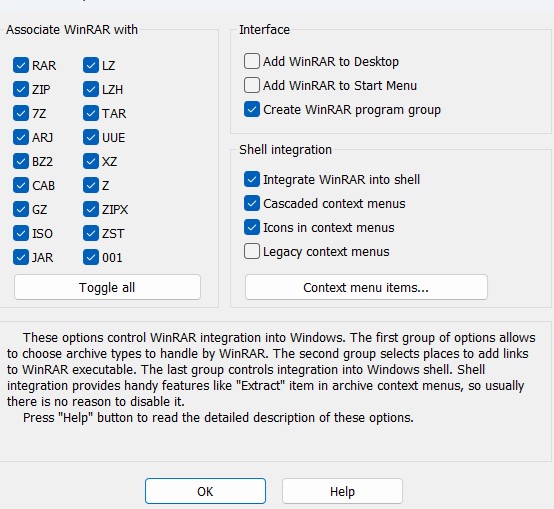
The Windows utility, which is compatible with all recent versions of the OS starting from Windows 7, boasts of an easy-to-navigate interface.
The moment I launched the desktop application, I realized that I am facing a clean interface that packs in a lot of useful features, but doesn’t make a clutter of it.
You got the simple tools that can get the job done, or you can simply explore the Wizard tool which is specifically designed for new users.
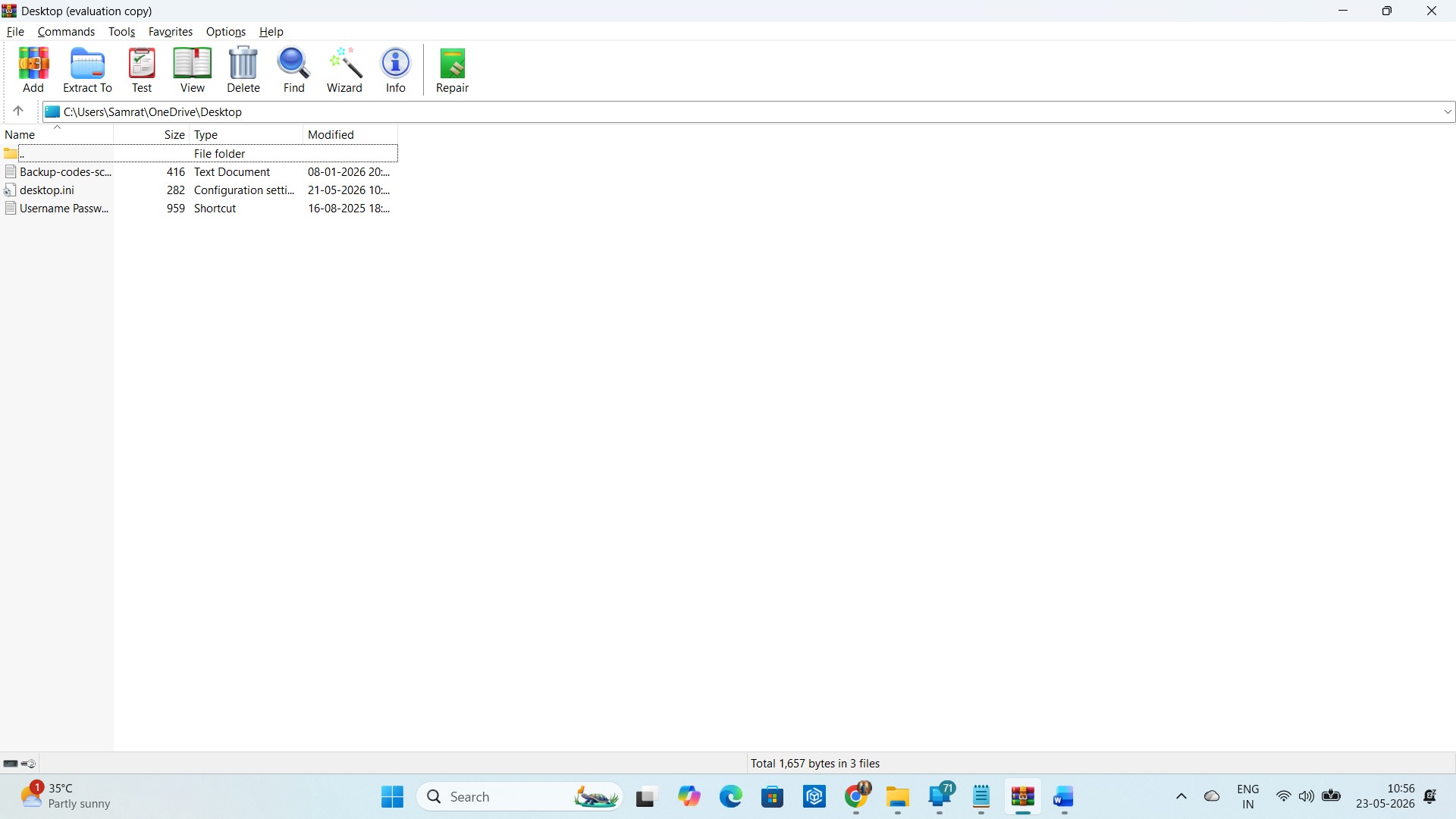
Once on the application, I could find multiple settings for configuration and archiving files. These also include NTFS settings.
The most commendable thing about these settings is that they are presented in such a simple and clutter-free manner that you would find navigating through all the options a cakewalk even if you have never used the utility before.
However, the best of all of them, in my opinion, is the feature that lets me save archival settings as a separate “Profile.”
I could apply the same to all subsequent archives. This is a great time-saver. The extraction speed I got was really cool, but I feel compression speed could be a lot better. More on that later.
For now, let’s focus on how WinRAR stands up against its competitors. Let’s do some data wrangling!
WinRAR vs competitors
WinRAR – How Much Competition-Ready Is It?
| Feature | WinRAR | WinZip | 7-Zip | PeaZip |
| Price Model | Paid trialware | Paid | Free & open source | Free & open source |
| Compression Efficiency | High | Moderate | Very High | High |
| Speed & Lightweight Use | Fast | Heavier | Very lightweight | Moderate |
| AES-256 Encryption |  | | | |
| Archive Repair/Recovery | Excellent | Basic | Limited | Good |
| Split Large Archives | | | | |
| Self-Extracting Archives | | | | |
| Interface Style | Classic | Modern | Minimal | Modern |
| Portable Version | | Limited | | |
| Cross-Platform Support | Windows only (additional mobile freeware versions for Android and macOS available) | Windows, macOS | Windows, Linux | Windows, Linux, macOS |
My personal experience
Did I Personally Find WinRAR Useful?
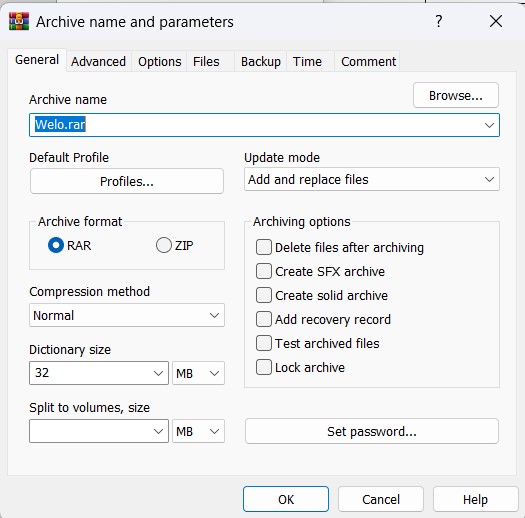
I installed the program on my Windows computer and attempted to archive a couple of files on my computer. The whole process felt easy-peasy right from the beginning.
The basic options are arrayed on the small window that appears when you click “Add to WinRAR.” I could rename the archive, choose the format of my preference and adjust compression settings as required.
I liked especially the way WinRAR let me tweak without making it too complicated.
I could switch between RAR and ZIP with just one click, choose a compression method from the dropdown, split the archive if required (I didn’t do it), and make it password-protected too.
Inside the right pane of this settings window, I also noticed a few extra checkboxes that are useful if you just want to lock the archive, or maybe test files post-compression, create a solid archive, and even add a recovery record.
Remember I am talking about the basics. If you want, you can also adjust NTFS settings and a few other things by visiting the “Advanced” option.
WinRAR is quite a speedy file compressor. However, later on, when I tried extracting the same files, I found that the utility is speedier on that front compared to compression.
Tech support
Can You Get Live Chat Support If You’re Stuck?
Unfortunately, no. And this is where I feel most of the commercial archiving solutions stand on the same ground.
Most do not offer a live chat support, and I think the reason is that the solutions were either developed way back in time, or maybe they are so simple and easy to use, at least most of them, that nobody ever felt that a user would need live chat support.
However, just in case you lose your product key or you have a technical query or maybe you are facing a roadblock, you can send an email to the company and expect a reply within the next 48 hours. Here is WinRar support page.
At present, the company offers support in both English and German, and I don’t think they are going to add more languages anytime soon. Why German, aside from English? Because Win.rar GmbH, the company, is based in Berlin.
Users' feedback
Do Users Upvote or Downvote WinRAR?
You’ve probably noticed that I used a Reddit-specific term here. That’s because Reddit is the place where you can find all the unfiltered opinions of real people hiding behind their usernames.
The social site is very different from many others, where marketing stuff overlap people’s honest opinions.
When I flicked through a bunch of Reddit threads about WinRAR, I realized that most people actually love its old-school interface. Many users literally grew up using WinRAR, so there’s lot of nostalgia at play here.
Some of them even added that they prefer its layout over that of 7-Zip as it’s easy to navigate. Many users use it for advanced stuff like splitting archives or repairing damaged archives, something that Windows still cannot handle.
One common opinion that resonated across these threads is that WinRAR is extremely easy to use, and that’s what really sets it apart.
Users' reviews summary
Is WinRAR a Winner on Review Sites?
I also checked out some WinRAR Trustpilot reviews. Trustpilot is more business-focused than Reddit, and I hoped to get some different insights, not necessarily opposing, from what I found on Reddit.
However, the opinions didn’t differ much.
Most users on Trustpilot too stated that WinRAR is extremely easy to use. They also loved how reliably it handles compression, extraction and password protection of file archives.
People seem to love it simply because it’s a no-nonsense lightweight desktop utility that have advanced functions hidden under the hood, but at the very least, it does the job of compressing and extracting files impeccably.
The interface, however, draws a lot of opinions, both good and bad. Some say that it feels outdated, while other love it exactly for the same reason.
They are like people stuck in the 1990s. They don’t want flashy redesigns, and I completely agree with them. Some things don’t need to change.
Conclusion
Is WinRAR a Good Buy?
WinRAR is an extremely easy to use file archiving and compression utility that packs in a range of advanced features most users would never need. You can use it for simple file compression tasks.
However, you can also use it for advanced tasks such creating recovery records, encrypting files, and creating multivolume archives. The software’s real utility and value depend on how you use it.
When it comes to going beyond the free trial, WinRAR offers a great value for money for its loyal customers. It offers a perpetual license with free lifetime upgrades.
So, there’s no renewal trap, and no paying a different price every year. Simply pay for a license and use it for as long as you wish.
While I wish its compression speeds were better, I would still recommend it because it’s one of the oldest and most trusted names in this niche, and WinRAR is probably not losing its market position in the foreseeable future.



WinRAR’s volume splitting is a lifesaver for large emails.
The ability to split archives into volumes using WinRar is a huge plus for handling large files.
The feature to split archives into multiple volumes is genuinely useful for system admins. Thanks for the review!