Parallels Desktop 27 for Mac Review: What Really Changed?
I discovered that Parallels Desktop 27 for Mac is a more significant release than its version number suggests, because the headline change is not simply another macOS compatibility update: Parallels has rebuilt the Windows graphics path around Apple Metal, added new AI-related CPU acceleration for newer Apple silicon, and simultaneously removed several legacy features and Intel-Mac support.
Parallels Desktop 27 was released on August 25, 2026, and the current 27 branch has already reached 27.0.2 (build 58673), released September 17. (Parallels Knowledge Base)
I found three changes that matter most:
- Windows OpenGL moves from 4.1 to 4.3 through a new Metal-based driver.
- M4/M5 Macs gain SME-based acceleration for certain Linux AI/ML workloads.
- Parallels 27 becomes Apple-silicon-only, while Parallels 26 remains the branch for Intel Macs. (Parallels Forums)
The first change is particularly important. OpenGL 4.3 is required by or useful to applications such as ArcGIS Pro and other professional engineering/GIS/CAD software that could previously hit the OpenGL 4.1 ceiling. Parallels says its own tests showed OpenGL workloads up to 2.6× faster, while selected ArcGIS Pro tasks were up to 35% faster and the complete tested workflow up to 24% shorter. Those are Parallels’ measurements, not independent benchmark results. (Parallels)
Pros&Cons
Pros&Cons | Strong and weak sides of the new version
What is new
What is new in Parallels Desktop 27
Metal-based OpenGL 4.3 driver
This is the feature I found most interesting.
Parallels has replaced the previous Windows OpenGL implementation with a graphics driver based on Apple’s Metal API. Windows 11 ARM virtual machines on Apple silicon can now expose OpenGL 4.3, up from 4.1. (Parallels Knowledge Base)
That matters because some professional Windows applications don’t merely prefer OpenGL 4.3—they require a newer OpenGL feature set.
Parallels specifically cites applications including:
- ArcGIS Pro
- ZWCAD
- Blender 4.3
- engineering and architecture applications
as examples of software that can benefit from the new graphics path. (Parallels)
But there is an important caveat: the new graphics implementation isn’t automatically perfect for every OpenGL application. I found current Parallels forum reports of Rhino 7 viewport-redraw problems and a separate report involving THERCAST NxT on an M1 Mac. In both cases, users reported that returning to Parallels 26.4.2 restored the previous behavior. (Parallels Forums)
AI/ML acceleration on M4 and M5
Parallels Desktop 27 adds support for Apple’s Scalable Matrix Extension (SME/SME2) in Windows and Linux VMs on supported newer Apple silicon.
The particularly important part is that this is not an M1/M2/M3 feature. The relevant acceleration requires M4 or later. (Parallels)
Parallels tested an M4 Pro running Ubuntu and reported:
- matrix computations up to 7× faster
- neural-network inference up to 1.75× faster
again using Parallels’ own testing methodology. (Parallels)
I like this direction because it addresses a problem that virtualization traditionally has: a VM can have plenty of CPU performance but still introduce enough overhead to make specialized workloads less attractive.
Better Linux support
Parallels 27 adds out-of-the-box support for newer distributions including:
- Ubuntu 26.04 LTS
- Ubuntu 26.04 LTS x86_64 under emulation
- Fedora 44
- Debian 13.6
- Kali Linux 2026.2
Parallels Tools for headless Ubuntu ARM VMs can also be updated from the command line. The shared-folder daemon has moved from libfuse2 to libfuse3, improving compatibility with modern Linux distributions. (Parallels Forums).
Enterprise changes
Enterprise customers get improvements around SSO and management, and Parallels 27 has ARM SystemReady SR 3.1 certification. (Parallels)
For an individual user, these features are mostly irrelevant. For managed Mac fleets, they matter considerably more.
Parallels 26 vs 27 comparison
What was improved compared with Parallels Desktop 26?
| Feature | Parallels Desktop 26 | Parallels Desktop 27 | What changed? |
| macOS compatibility | macOS Tahoe 26 and earlier supported | Adds native macOS 27 Golden Gate support | Major platform update |
| Apple silicon | M-series | M1–M5 | Continues support |
| Intel Mac |  |  | Major compatibility cut |
| Windows 11 ARM | | | Continued |
| Windows OpenGL | Up to OpenGL 4.1 | OpenGL 4.3 | Major graphics upgrade |
| Graphics architecture | Previous graphics driver | Metal-based OpenGL driver | Re-engineered |
| OpenGL performance | Baseline | Parallels claims up to 2.6× in selected tests | Potentially substantial |
| ArcGIS Pro | Limited by OpenGL support in some workflows | Hardware-accelerated OpenGL 4.3 | Major compatibility improvement |
| Linux AI/ML acceleration | No SME2 support | SME/SME2 on M4/M5 | New |
| New Linux distributions | Earlier generation | Ubuntu 26.04, Fedora 44, Debian 13.6, Kali 2026.2 | Updated |
| Linux shared folders | libfuse2 | libfuse3 | Modernized |
| macOS VM | Supported | Supported | Continued |
| Boot Camp | Already being phased out | Removed | Legacy feature gone |
| Travel Mode | Available in 26 | Removed | Removed |
| Intel Macs | Supported | Removed | Important |
| Shared Bluetooth | Available/legacy support | Removed as direct VM feature | Important for some users |
| Security preferences | Local Security tab | Enterprise-managed approach | Changed |
| Current release | 26.4.2 | 27.0.2 | 27.x is current |
| Support horizon | Free email support through Aug. 2027 | Through Aug. 2028 | One additional year |
Parallels’ own lifecycle table currently lists free email support through August 25, 2028 for version 27, versus August 26, 2027 for version 26. (Parallels Knowledge Base)
The 26 branch itself was already mature. Its later releases fixed Windows crashes, OpenGL rendering problems, Coherence issues, networking problems and other compatibility bugs. (Parallels Knowledge Base)
Important note
One thing I discovered that is easy to miss
The most interesting “under the radar” detail I found is that Parallels 27 is not simply Parallels 26 with a new graphics driver.
The version transition changes the product’s architecture and lifecycle simultaneously:
Parallels 26 -> Parallels 27
means:
Intel compatibility -> Apple silicon only
OpenGL 4.1 -> OpenGL 4.3
old graphics implementation -> Metal-based implementation
no SME2 VM acceleration -> SME2 support on M4/M5
libfuse2 -> libfuse3
Boot Camp/Travel Mode/legacy functions -> removed
That makes version 27 much more of a platform transition than an ordinary annual software upgrade.
There is another useful detail: Parallels 26 isn’t immediately obsolete. Parallels currently expects to maintain version 26 through 2027, so an Intel Mac owner isn’t forced to replace the computer simply because Parallels 27 exists. (Parallels Knowledge Base)
Weak sides of 27 version
What I dislike about Parallels Desktop 27
The feature removals deserve much more attention than they receive in typical launch coverage.
Parallels 27 removes:
- Intel Mac support
- Boot Camp support
- Travel Mode
- Shared Bluetooth functionality for direct VM attachment
- the old Security preferences tab
- Classic Outlook unread-mail badges/notifications
- Ventura 13 as a host OS
The Intel decision is understandable from a technical standpoint because macOS 27 itself is Apple-silicon-only. But it still means an owner of a perfectly functional Intel Mac cannot simply treat Parallels 27 as an ordinary upgrade. (Parallels Knowledge Base)
I also found the OpenGL situation worth watching. The new driver solves a long-standing compatibility problem, but forum reports show that changing a graphics subsystem can introduce application-specific regressions. Rhino 7 users, for example, have reported viewport-refresh problems that weren’t present in 26.4.2. (Parallels Forums)
Features comparison table with competitors
Parallels Desktop 27 vs VMware Fusion vs VirtualBox vs CrossOver vs UTM
One important point: these products aren’t identical categories.
Parallels, VMware Fusion, VirtualBox and UTM are virtualization/emulation platforms. CrossOver is a Windows compatibility layer. CrossOver doesn’t install a complete Windows OS. (CodeWeavers)
| Feature | Parallels 27 | VMware Fusion 26H1/25H2 family | VirtualBox 7.2 | CrossOver 26 | UTM |
| Full Windows VM | | | | | |
| Windows 11 ARM on Apple silicon | | | | N/A | |
| x86 Windows OS on Apple silicon | | | | N/A | Can emulate |
| Intel Mac support | No in 27 | | | in current 26 branch | |
| Windows app compatibility | High, through Windows ARM | High, through Windows ARM | More limited integration | Depends on Wine compatibility | Depends on VM/emulation |
| Windows OpenGL | 4.3 | DirectX 11 support documented | More limited graphics on ARM | Uses D3DMetal/DXMT/DXVK | Windows GPU acceleration is limited |
| DirectX gaming | | DirectX 11 on Apple silicon | Limited | Strong gaming focus | Weak for Windows 3D |
| macOS integration | Very strong | Moderate | Moderate | Strong app integration | Moderate |
| Coherence/Unity-style mode | | Unity on Apple silicon | Seamless mode | Windows apps appear as Mac apps | Basic |
| Snapshots | | | | Bottles rather than VMs | |
| Linux | Excellent | Excellent | Excellent | Linux version exists | Excellent |
| macOS VMs | | | Experimental/limited | | |
| Emulation of older architectures | Limited | Limited | Limited | | Excellent |
| Open source | | | | Partly based on Wine | |
| Cost model | Paid | Free for all use cases | Free/open-source base | Paid | Free/open source |
| Ease of use | Very high | High | Medium | High for supported apps | Medium |
| Developer controls | Very strong in Pro | Strong | Strong | Application-level | Very strong |
| Best suited to | Windows + Mac integration | VMs without a Parallels subscription | Technical users | Windows apps/games without Windows | Developers/enthusiasts/emulation |
VMware’s current documentation confirms that Fusion supports both Intel and Apple-silicon Macs, and its free version includes features previously associated with Fusion Pro, including snapshots, encryption, vTPM and advanced networking. On Apple silicon, however, Fusion requires ARM64 guests; it cannot directly run an x86 Windows operating system. (VMware)
Oracle’s current VirtualBox 7.2 documentation says Apple-silicon hosts can run ARM64 guests including Windows 11, but x86 guests do not run on ARM hosts, and Oracle lists limitations around graphics, sound, storage and Guest Additions on ARM. (Oracle)
UTM takes a different approach. It combines Apple’s virtualization framework with QEMU and can also emulate other CPU architectures. The important distinction is that UTM can run x86/x64 operating systems on Apple silicon through emulation, although at substantially lower performance than native ARM virtualization. UTM also lacks Windows GPU virtualization/acceleration comparable to Parallels. (UTM)
CrossOver is the other particularly interesting alternative. It doesn’t require Windows at all and instead translates Windows API calls through Wine. Its current graphics stack includes D3DMetal, DXMT and DXVK, which makes it particularly relevant to Mac gaming. (CodeWeavers)
Where competitors are better or worse
Which competitor makes sense for which scenario?
I wouldn’t describe these products as interchangeable.
Parallels Desktop 27
The feature set makes sense when you need:
- Windows 11 ARM
- strong Mac/Windows integration
- professional Windows software
- OpenGL 4.3
- Coherence
- multiple displays
- USB/peripheral integration
- Linux development
- M4/M5 Linux AI workloads
Parallels’ current Standard/Pro distinction is also significant: Pro provides much higher VM resource limits, command-line/developer features and advanced controls.
VMware Fusion
VMware Fusion is particularly relevant if licensing cost and technical control are more important than Parallels-style integration.
Its current free offering includes features such as snapshots, encryption, vTPM and advanced networking, while Fusion continues to support Intel and Apple-silicon Macs. (VMware)
Its Apple-silicon limitations are worth understanding, particularly around ARM guests and integration features.
VirtualBox
VirtualBox is compelling when you want a free/open-source virtualization platform and don’t mind doing more configuration yourself.
Its current 7.2 branch supports Windows 11 ARM on Apple-silicon Macs, but Oracle explicitly documents ARM-host limitations and no x86 guest support on ARM hosts. (Oracle)
CrossOver
CrossOver is fundamentally different.
If you only need one or several Windows applications, installing a complete Windows VM may be unnecessary. CrossOver translates Windows APIs rather than virtualizing Windows. (CodeWeavers)
It is especially interesting for gaming because its current technology stack includes D3DMetal and DXMT, and CrossOver 26 added support/fixes for a substantial number of Windows games. (CodeWeavers)
CrossOver also has a lifetime-license option, which is a meaningful alternative to a perpetual/annual virtualization subscription model.
UTM
UTM is the option I would examine when emulation and experimentation matter more than polished Windows integration.
It combines Apple virtualization with QEMU and can emulate architectures that normal Apple-silicon virtualization cannot. Its Windows 3D acceleration situation is considerably weaker, though, particularly for demanding Windows games. (UTM)
How to use guide
How to use Parallels Desktop 27: Basic Windows 11 Scenario
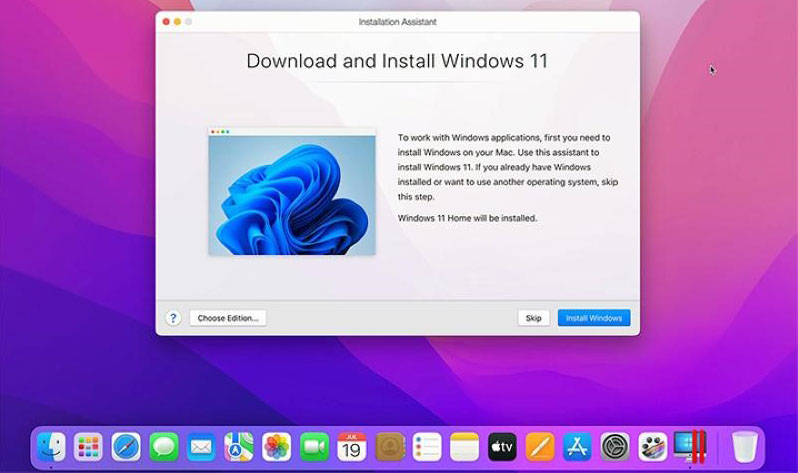
Here’s the basic workflow I found in Parallels’ current documentation.
Step 1 – Check your Mac
Open:
Apple menu -> About This Mac
You need an Apple-silicon Mac for Parallels Desktop 27. If the Mac has an Intel processor, Parallels 26 is the branch you need. (Parallels Knowledge Base)
Step 2 — Install Parallels Desktop 27
Download Parallels Desktop from the official site and launch the application.
Step 3 – Create Windows 11
On an Apple-silicon Mac, Parallels can download Windows 11 ARM automatically.
The basic route is:
Parallels -> Control Center -> + -> Get Windows 11 from Microsoft -> Continue -> Install Windows
Parallels downloads and configures the Windows installation automatically. (Parallels Knowledge Base)
Step 4 – Let Windows finish installation
Windows will boot and complete its setup.
You’ll need to sign into Windows/Microsoft as appropriate and activate Windows with the appropriate Microsoft license.
Step 5 – Install Parallels Tools
This is important after upgrading to 27.
Parallels Tools provides the Windows display driver and integration functionality. Parallels specifically says that the Windows OpenGL 4.3 driver is provided through Parallels Tools, so updating Tools after upgrading is worthwhile. (Parallels Knowledge Base)
Step 6 – Choose how Windows appears
You can run Windows:
Full screen
or use Coherence mode, where Windows applications appear alongside Mac applications without showing the normal Windows desktop.
For example:
- macOS Safari
- Windows Excel
- macOS Mail
- Windows accounting software
can all appear together.
That’s one of the reasons I found Parallels substantially more “Mac-like” than a conventional VM interface.
Step 7 – Configure RAM and CPU
For ordinary Office/business applications, don’t automatically allocate every available CPU core or half your Mac’s memory.
The current Standard edition supports up to 4 vCPUs and 8 GB vRAM, while Pro goes up to 32 vCPUs and 128 GB vRAM per VM. (Parallels)
For an ordinary 16 GB Mac, I would start conservatively and increase allocation only if the workload needs it.
Step 8 – Configure sharing
Parallels can share:
- Mac folders
- clipboard
- files
- displays
- keyboard/mouse
- camera
- microphone
- USB devices
This is where Parallels’ polish becomes apparent compared with more bare-bones virtualization tools.
Running ArcGIS Pro
A useful advanced scenario: running ArcGIS Pro
This is where Parallels 27 becomes more interesting.
- Install Windows 11 ARM.
- Install Parallels Tools.
- Install ArcGIS Pro.
- Confirm the Windows display driver reports OpenGL 4.3.
- Run the application.
- Compare viewport/rendering behavior with the 26.x installation if you have a backup.
Parallels says the new driver was specifically designed to expand support for professional Windows software such as ArcGIS Pro, and selected ArcGIS workflows were up to 35% faster in its testing. (Parallels)
Users feedback
Forum feedback: what are real users talking about?
This is where I found a much more complicated picture than the marketing material suggests.
“OpenGL 4.3 finally arrived”
There is clear interest from users who have been waiting for OpenGL 4.3 specifically. One long-running Parallels forum discussion shows users asking for 4.3 support because particular professional applications required it. (Parallels Forums)
So the feature is addressing a real historical limitation rather than being merely a benchmark feature.
But some users immediately reported regressions
The Rhino 7 report is particularly concrete: a user says 27.0.1 caused viewport refresh problems while 26.4.2 worked normally, and another user reported a similar OpenGL-related problem with DesignBuilder. (Parallels Forums)
Another forum user reported black shaded surfaces in THERCAST NxT on an M1 Mac, while software OpenGL worked and version 26 reportedly didn’t have the problem. (Parallels Forums)
Feature removals are controversial
On Reddit, one Parallels user complained that version 27 appeared to move some VM isolation functionality behind the Pro tier and objected to the disappearance of configuration controls. Another commenter criticized the direction toward subscriptions and questioned annual performance-improvement claims. These are individual user opinions, not independently verified measurements. (Reddit)
There are also mundane 27.x bugs
The Parallels forum currently contains reports concerning:
- missing VM/application behavior
- Coherence keyboard issues
- iCloud Drive access
- multiple-file opening
- Dock screenshots
- popup windows
- Windows VMs disappearing after upgrade
- macOS guest full-screen toolbar behavior
The forum list shows that these reports are being actively discussed, although their prevalence cannot be inferred from forum-post counts alone. (Parallels Forums)
TrustPilot reviews summary
What people are saying on Trustpilot?
The Trustpilot picture is substantially more negative than the technical forums.
At the time of research, Parallels’ Trustpilot profile showed a 1.5/5 TrustScore from about 1,800 reviews. Trustpilot’s own automated summary highlights complaints about subscriptions, auto-renewals, refunds and customer service. (Trustpilot)
Recent reviews include complaints about:
- unexpected or disputed renewal charges
- difficulty cancelling subscriptions
- refund disputes
- difficulty reaching human support
- occasional performance problems
There are also positive comments about the software itself; the Trustpilot page notes that some customers describe the core application as high quality.
Therefore, I would not use the Trustpilot score as a benchmark for virtualization quality. But I also wouldn’t ignore it when evaluating the ownership experience.
Conclusion
My overall assessment
I found Parallels Desktop 27 to be a more technically interesting upgrade than Parallels 26, but not necessarily an automatic upgrade for every existing user.
The most meaningful improvement is OpenGL 4.3 through the new Metal graphics driver. If your Windows application was blocked by OpenGL 4.1, this can fundamentally change what’s possible. The M4/M5 SME acceleration is similarly interesting for Linux AI/ML development.
I liked the direction of the Linux improvements, too, because libfuse3 and better current-distribution support are the sort of changes that developers notice over time rather than on a marketing screenshot.
I dislike the fact that some legacy functionality has disappeared, and I would be cautious about upgrading a production CAD/GIS/OpenGL environment without testing it first. Current forum reports demonstrate that the new graphics driver can expose application-specific problems even while expanding overall compatibility.
And I would separate Parallels the technology from Parallels the company/customer experience. The Trustpilot feedback contains serious recurring complaints about billing and support, whereas the technical forums contain a much more mixed picture of actual VM performance and compatibility.