AWZ PC Cleaner Test – Is The 2026 Version of the PC Cleaner Worth Every Dollar?
Sluggish PCs are a royal pain. Especially in older PCs, programs take seemingly eternity to open, storage disappears mysteriously, and we discover old files piled up where we least expected them.
AWZ PC Cleaner is designed to clean up that mess with tools for junk removal, duplicate files, app cleanup, startup management, and Windows optimization.
On paper, it sounds like an easy way to give an aging or cluttered PC some breathing room. But PC cleaners have made plenty of big promises over the years, so I wanted to see what AWZ could actually pull off. Read on to find out its strengths and weaknesses.
What's new?
AWZ PC Cleaner 1.3.2 – What’s Under the Hood?
AWZ PC Cleaner 1.3.2 rolled out on May 19, 2026, with most of the work going into cleanup and file detection. This is the first commercially available version of the software. I discovered that the new software can dig out hidden cache, temp files, and leftover system clutter quite effectively.
Besides that, AWZ PC Cleaner can detect duplicate files faster and with more accuracy, which should help when you’re sorting through a crowded drive and trying to do away with repeated files that eat up a lot of your disk space.
I found that it has got a sleek interface. AWZ also did some bug fixes and general performance tuning to keep things running more smoothly. However, they are expected to add more features and update the program in the near future.
Is it easy to use?
How to Use AWZ PC Cleaner?
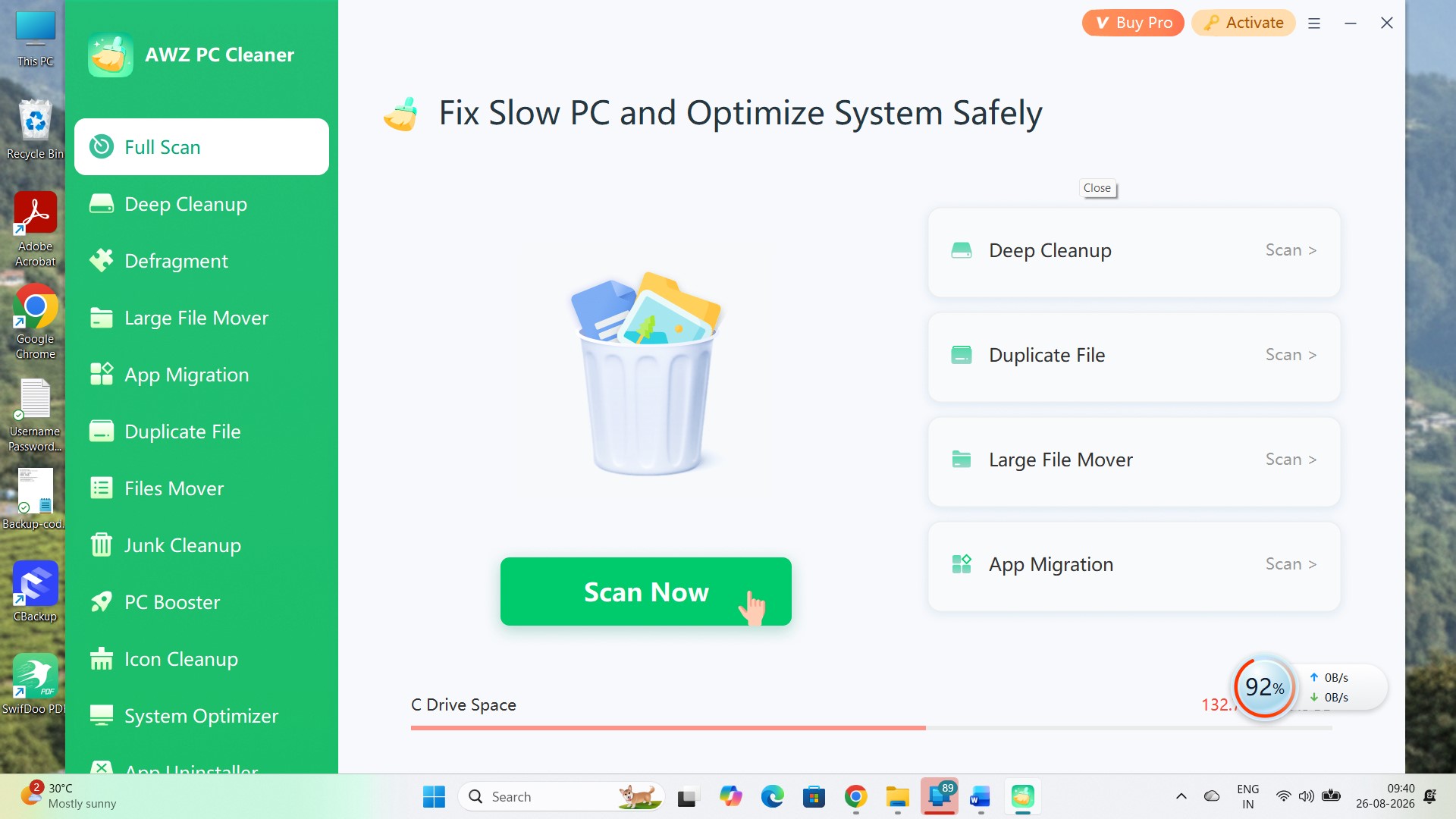
AWZ PC Cleaner is an extremely easy to use. You will find all of its tools in the panel on the left. You don’t have to page through menus to find the tools. I would suggest starting with a full scan, as it does the basic cleanup of the PC.
Open the application and click “Scan Now” to check the key areas for PC cleanup.
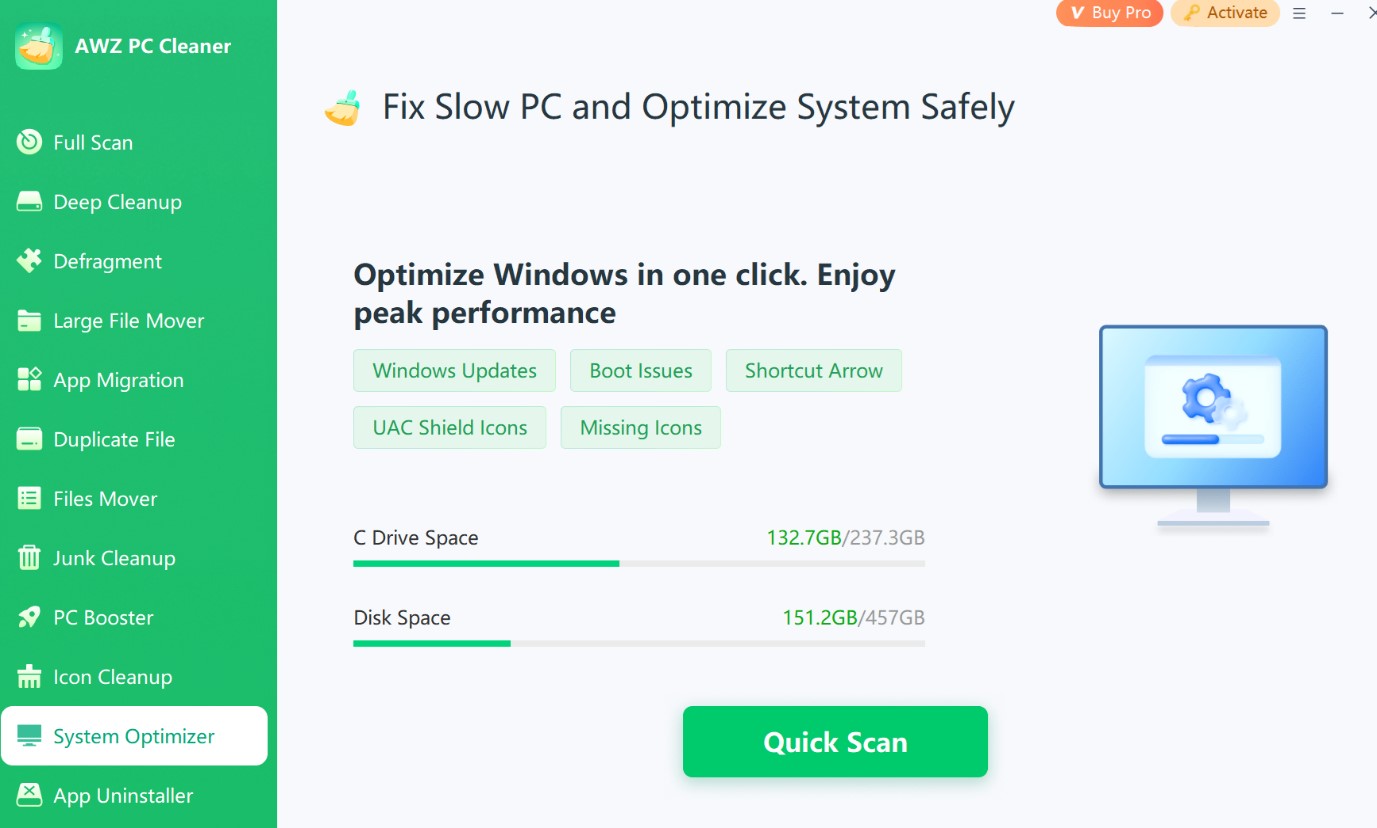
If the PC needs a broader tune-up, head to System Optimizer and hit Quick Scan. This section checks Windows-related items such as boot issues, Windows updates, missing icons, shortcut arrows, and UAC shield icons.
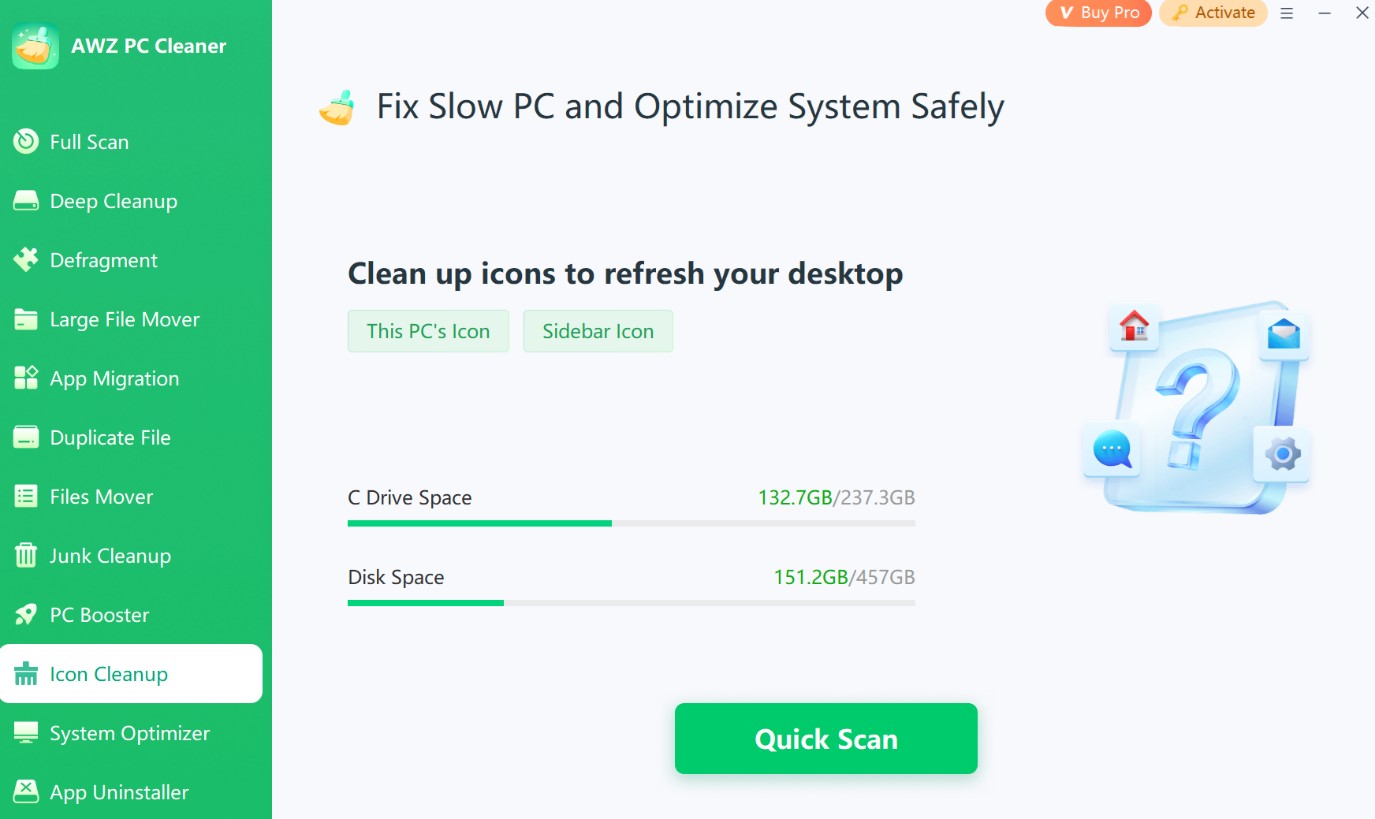
For unwanted clutter, choose Junk Cleanup. The utility can look for System Junk, Registry Junk, App Junk, and Malware, with another prominent Quick Scan button keeping the process simple.
There is more under the hood if you want to go beyond routine cleaning. PC Booster targets startup and system performance, while Duplicate File can search for repeated documents, photos, videos, audio files, and archives. Large File Mover helps shift storage-heavy files elsewhere and includes file filtering, batch processing, and logs.
AWZ also provides a dedicated Defragment utility. Run an analysis and it displays the number of fragments, the amount of fragmented data, and the fragmentation rate alongside a visual drive map. In my opinion, the overall workflow of AWZ Pc Cleaner is easy to get the hang of.
You choose a tool from the sidebar, scan, review what AWZ finds, and then decide what needs attention. Yes, there are advanced tools, but these tools are also easy to make the most of. Here’s what you can do with AWZ PC Cleaner (and also what you can’t do with it).
Features table
AWZ PC Cleaner – Fast Facts
| Feature | Details |
| Supported devices | Windows 11/10/8.1/8/7 |
| PC cleanup |  |
| Email protection |  |
| Scheduled cleaning | |
| Disk defragmentation | |
| Startup optimization | |
| Registry cleaner | |
| Real-time monitoring | |
| File recovery | |
| Untrusted programs blocking | |
| Internet booster | (PC Booster included) |
| Windows optimization | |
| Customer support | email support |
| Price | $9.95/month; $34.95/year; $39.99 perpetual (2 PCs) |
Search trends
Search Interest: AWZ PC Cleaner vs. Competitors
AWZ PC Cleaner is still the new kid on the block, and when I used Google Trends to analyze the search trends, the numbers made it pretty clear. The software name was searched by only a negligible number of people over the past year, and the number rose up to 100 around May/June 2026, just when it was launched.
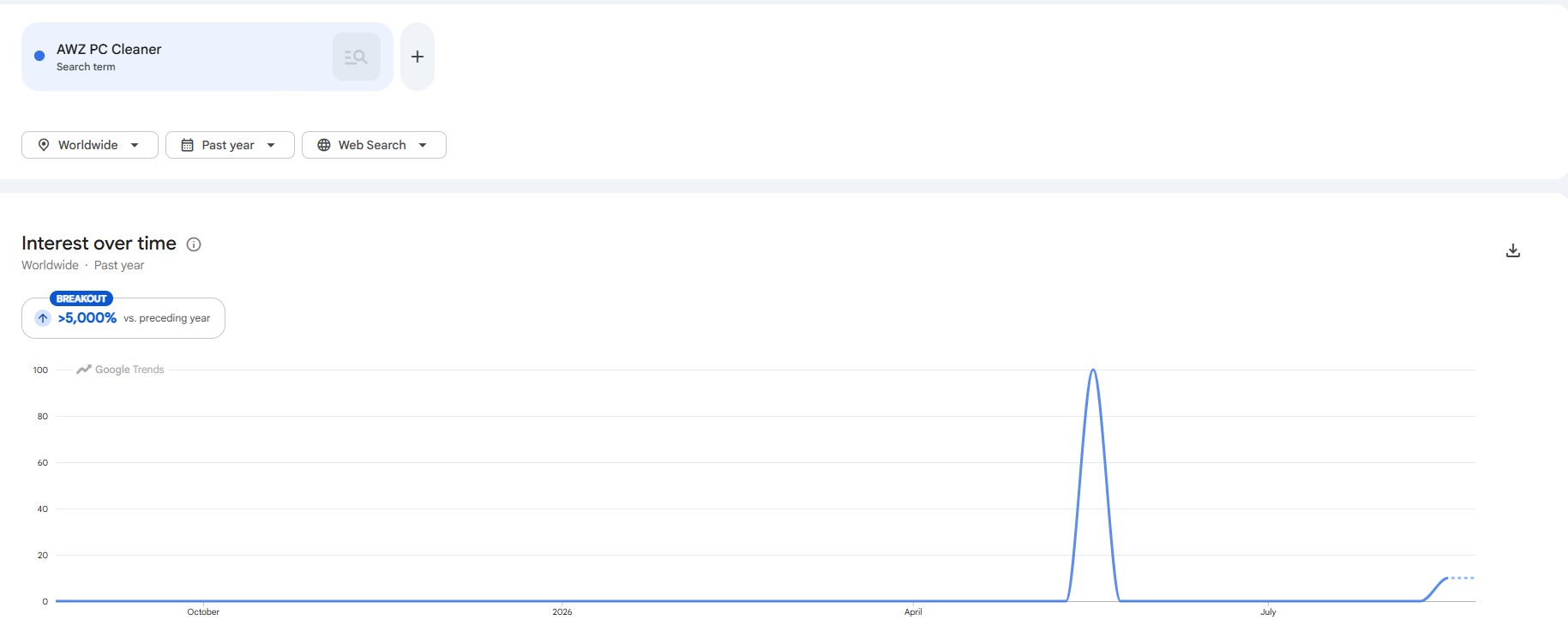
Since Google Trends tracks relative search interest, I figured that it was a short episode of gaining new attention than evidence that AWZ has suddenly gone mainstream. For new product in a fiercely competitive space, it is completely normal.
Comparing AWZ with Wise Care 365 and Auslogics BoostSpeed made the gap much easier for me to see. Wise Care 365 leads comfortably, with an average interest score of 68 over the period shown.
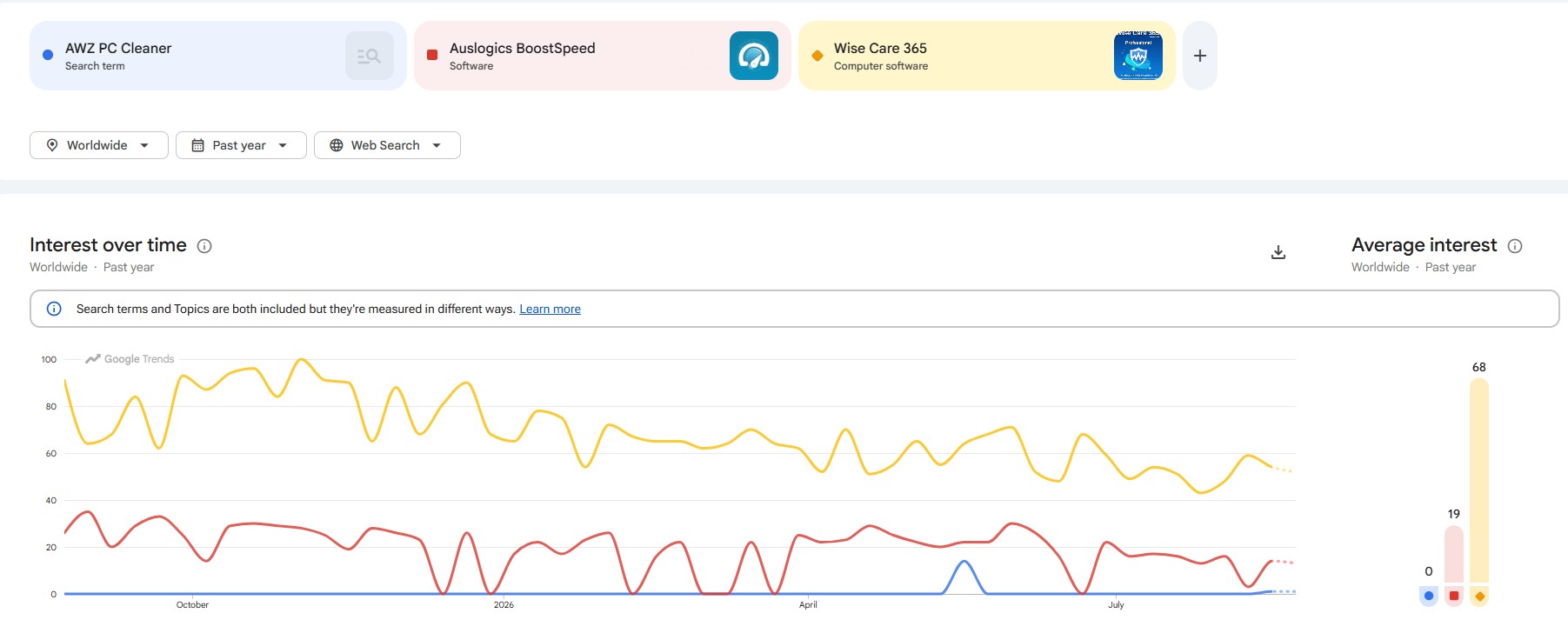
Auslogics BoostSpeed comes in at 19, while AWZ rounds down to 0 because its interest is negligible for most weeks. Even AWZ’s brief midyear jump only reaches the lower portion of the comparison chart.
Auslogics BoostSpeed has something AWZ can’t build overnight: a long track record. Its developer has been making Windows optimization software since 2008 and says its programs have racked up more than 50 million downloads.
It has had plenty of time to build a following, and it also casts a wider net, with tools for cleanup, startup management, disk optimization, scheduled maintenance, privacy, and Internet optimization.
Wise Care 365 has an even bigger lead in search interest. Its consistently higher trend line suggests a much stronger existing audience rather than the short-lived bursts seen with AWZ. That matters because established PC utilities tend to benefit from repeat users, recommendations, older reviews, and years of accumulated web exposure. AWZ is starting much farther back in that race.
AWZ, therefore, isn’t competing on equal footing yet. Its search footprint remains tiny beside these better-known utilities. For a relatively new name, that may be the more telling number right now.
AWZ vs Auslogics vs Wise Care
AWZ PC Cleaner vs. Auslogics BoostSpeed vs. Wise Care 365 – Who Leads the Pack?
| Feature | AWZ PC Cleaner | Auslogics BoostSpeed | Wise Care 365 |
| Supported devices | Windows PCs | Windows PCs | Windows PCs |
| PC cleanup | | | |
| Junk file cleanup | | | |
| Registry cleanup | | | |
| Disk defragmentation | | | |
| Startup optimization | | | |
| Duplicate file finder | | | |
| App uninstaller | | | |
| Scheduled/automatic cleaning | | | (in Pro version) |
| Real-time system protection | | | |
| Internet optimization | | | |
| Privacy protection | Limited | | |
| Browser privacy/anti-tracking | | | |
| SSD optimization | No dedicated tool | | |
| Automatic updates | | | |
| Free version | | | |
Users' feedback
What Are the Users’ Opinions?
Since AWZ PC Cleaner is a relatively new software product, it has garnered little to none user feedback and ratings across the social media pages. I found only a handful of insubstantial remarks across major social media platforms like Facebook.
On multi-platform app stores like Uptodown, the picture is no different either. I found only one user rating as I write this, although it’s a five-star one. The software also got distributed via Cnet, but the site doesn’t feature any user reviews as yet. There are no verified user reviews on sites like Sitejabber and Trustpilot.
On the biggest discussion forum, Reddit, I found that a long-time Redditor posted about AWZ Pricing and giveaways, but there has been no activity on that discussion thread yet. This is understandable, as the new PC cleanup software is yet to gain some traction.
Conclusion
Final Verdict – Is AWZ PC Cleaner Worth It?
I’d pick between these three based on what I actually needed from my PC cleaner. Auslogics BoostSpeed is designed for advanced users, while Wise Care 365 is is great for hands-off maintenance and privacy. AWZ keeps things lighter. It covers the cleanup jobs most home users are likely to care about without piling on too many extras.
I also like the perpetual-license option. And AWZ isn’t starting from square one. Its developer is also behind SwifDoo PDF, a widely downloaded PDF tool. That established software background gives AWZ PC Cleaner some solid backing, even if the product itself still has room to grow.