MyCleanPC Review – Windows PC Cleanup and Optimization Tool That Comes with a Free Trial
There’s no dearth of Windows PC cleaners out there. Some are costlier than others and pack in a bevy of features, while others come at a fraction of the cost and have much less features and functionalities.
MyCleanPC sits exactly in the middle. I recently had a chance to test out the mid-tier PC cleanup software and I loved its simple interface and reliable performance.
If you hate the numerous features and settings of higher-end PC cleaner software programs, as these settings usually come with a steep learning curve, look for an alternative that has usability at its core. MyCleanPC, in my opinion, is a powerful PC cleanup tool, yet it’s incredibly simple.
And that’s where its true strength lies. Let’s learn more.


Pros and cons
<strong>MyCleanPC Pros and Cons</strong>
What's new?
<strong>What’s New in the Latest Version of MyCleanPC?</strong>
The latest version of MyCleanPC, version 4.3.5, was rolled out on April 3, 2026. I found that this updated version comes with improved system scan capabilities, is now a lot better than ever before at detecting junk files, and it is now compatible with the latest Windows Operating Systems too.
MyCleanPC has been around for quite some time now, but the fact that it is now 100% Windows 11 (64-bit) compatible can be a true game changer I believe.
My personal experience
<strong>How to Use MyCleanPC?</strong>
MyCleanPC is a Windows-only software program. If you are a Windows user, you can download it straightaway by visiting the official website.
The software runs on a freemium model, which means you don’t have to provide your credit card information for downloading and installing the software, and for checking out its basic features and functions.
After downloading the “MyCleanPCInstall.exe” file, go to the location where it is saved, and click on the file to install it.
Select “Yes” from the dialog box to proceed with the installation. Click “Install” when the installer asks you to do so.
The free version includes all the essential tools for optimizing your PC. You can upgrade anytime to unlock all the features.
If you have already purchased it, and you have the activation key, go to “Activate Now”, the green button which you can find in the lower left corner of the apo interface, enter the key, and start using the full version right away.
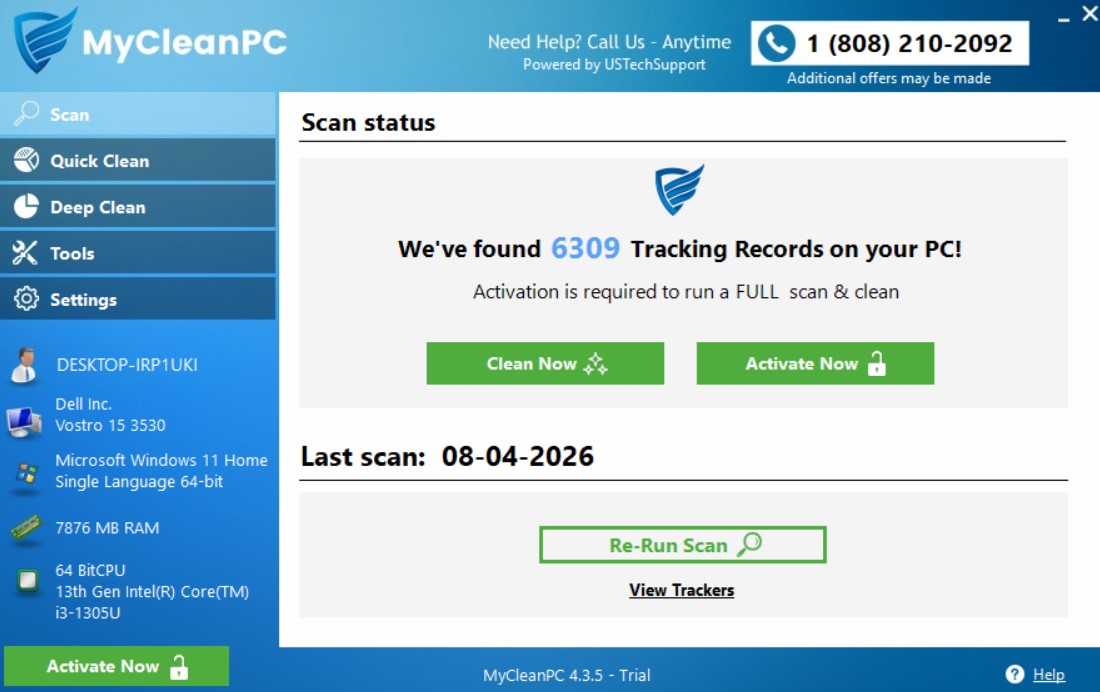
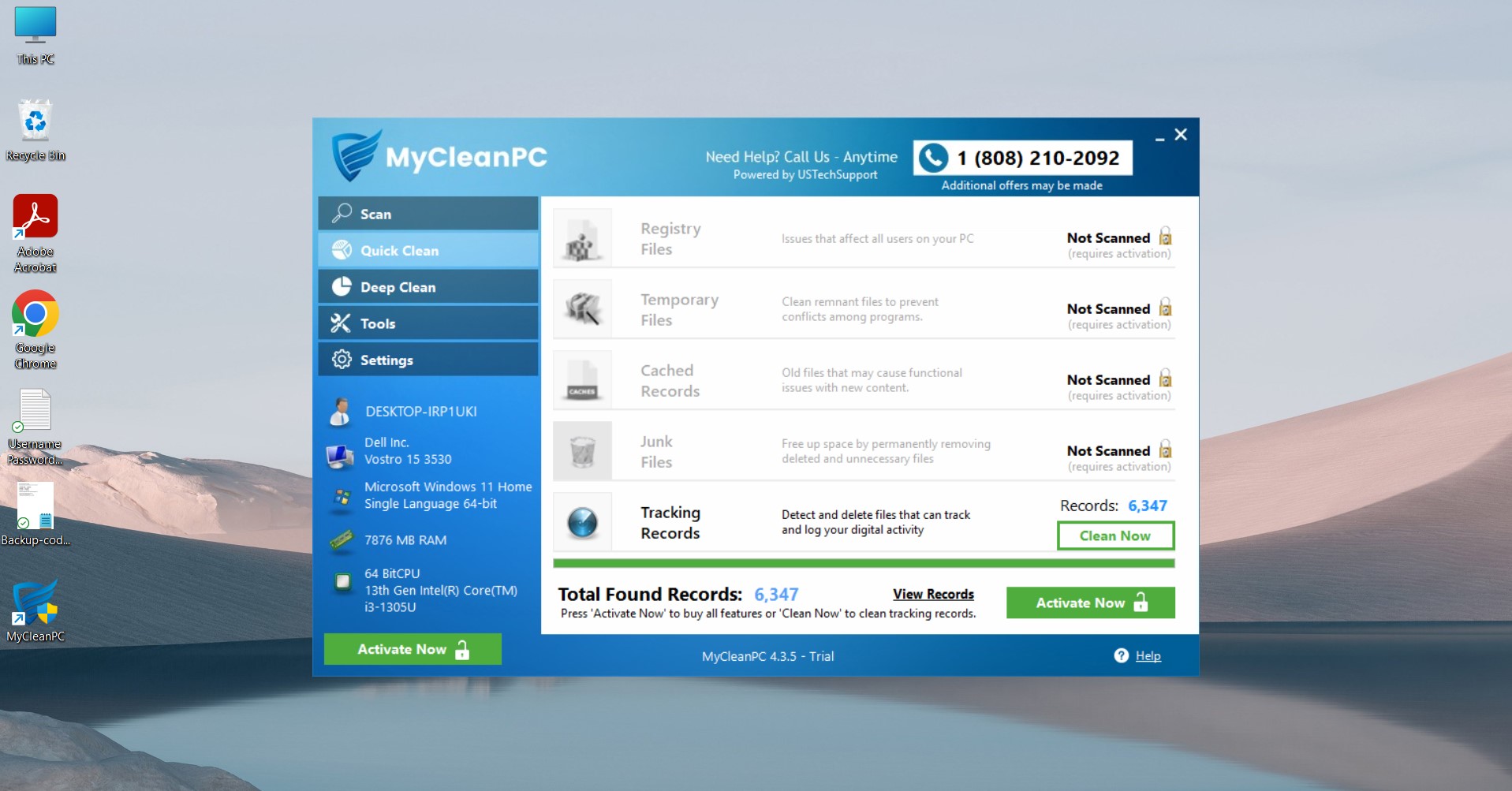
I downloaded the trial version and explored its basic features. I found that the trial version is more of a free diagnostic tool than anything else. It doesn’t let you fully clean your PC, but it will let you do a quick scan.
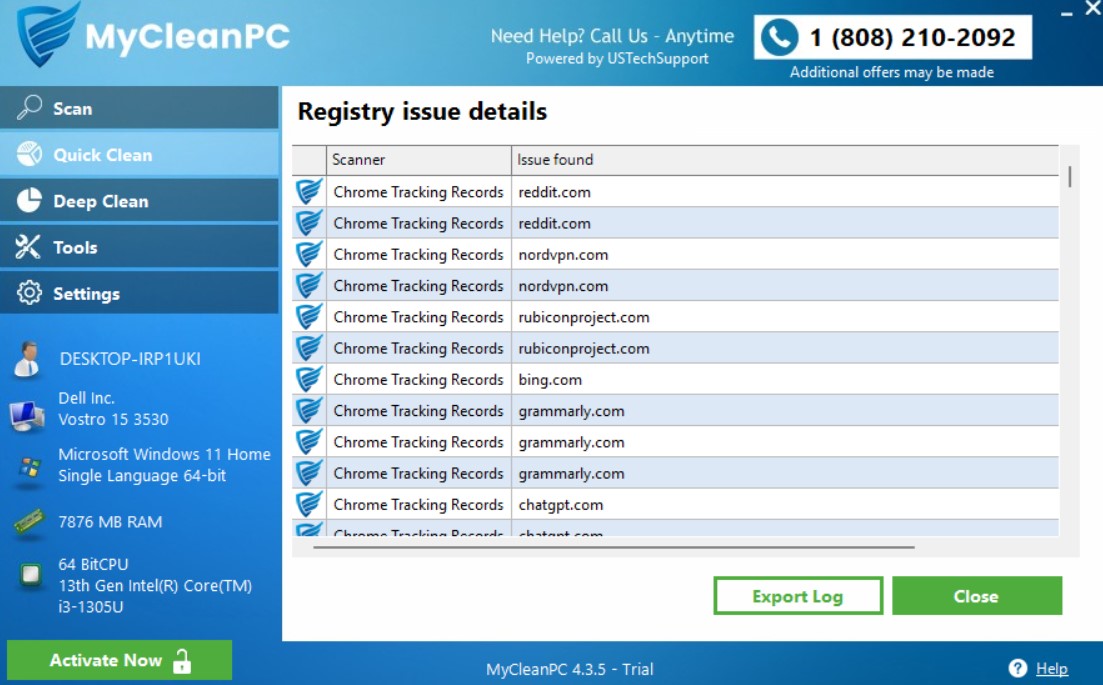
I scanned my PC and found a few thousand tracking records. Needless to mention that I was quite surprised to see so many issues lurking deep beneath the glossy interface of my Windows PC.
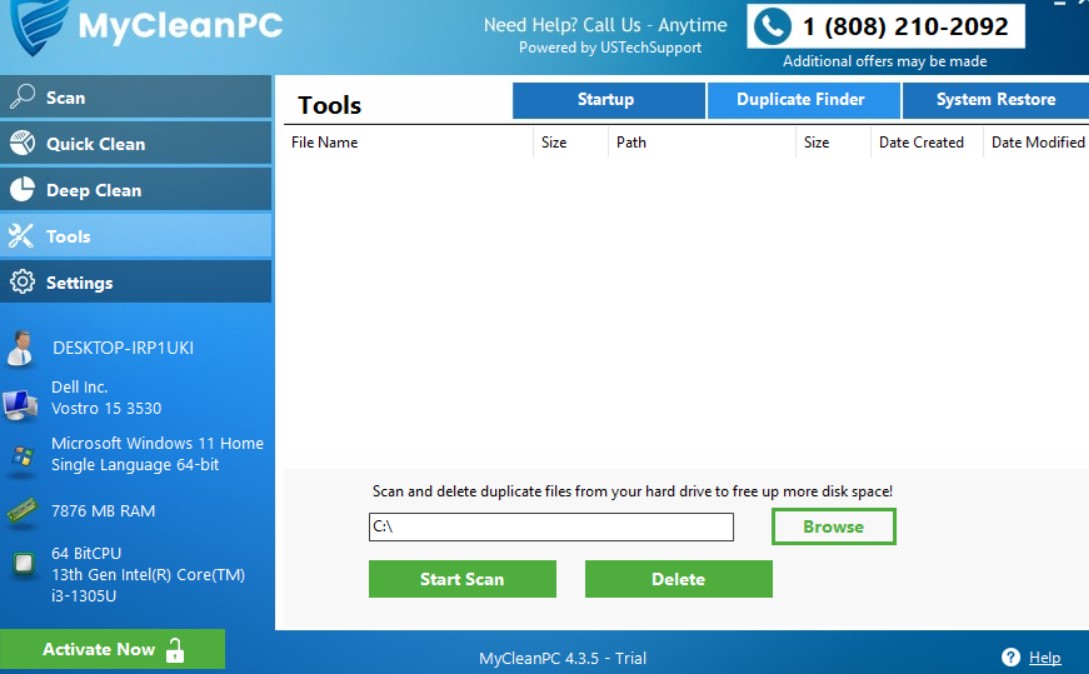
The free version lets you detect and delete files that can log my digital activity. Sure, it’s more than just clearing the browser caches that build over time, but that’s it. To go beyond the basics and to clean your PC fully, you need to activate the key.
<strong>It’s Extremely Easy to Use</strong>
The whole process of scanning, scheduling, detecting, and deleting unwanted files is a no-brainer, as I found it. All the important features are arrayed neatly on the left pane of the application.
From here, you can go for a quick scan, opt for quick clean, or upgrade and go for deep cleaning, explore the tools, which include even a system restore option, and access settings to schedule scans.
What is the scan speed?
<strong>How Fast Is the Software?</strong>
As I continued exploring its features, I decided to put MyCleanPC to test and see how fast and how well it works. I ran a quick scan, which took less than five minutes, and found more than 6,000 tracking records in my PC. That was really scary!
I also played a bit with the deep scan and the tools that it offers. One thing that I absolutely loved is the navigation of the desktop application.
You could jump from quick scan to deep clean in a matter of seconds, and then switch to tools or settings. It scans files really quick, which I realized during my session.
Here’s an overview of what the software offers, and what it doesn’t.
Features overview
<strong>MyCleanPC – Features at a Glance</strong>
| Features | Availability |
| Supported devices | 1 |
| PC cleanup |  |
| Email protection |  |
| Scheduled cleaning | |
| Disk defragmentation | |
| Startup optimization | |
| Registry cleaner | |
| Real-time monitoring | |
| File recovery | |
| Untrusted programs blocking | |
| Internet booster | |
| Software updater | |
| Customer support | Live Chat, Phone, Online Form |
| Price | $39.95 per license for the first year |
Search trends
<strong>Is MyCleanPC a Hot Search Trend?</strong>
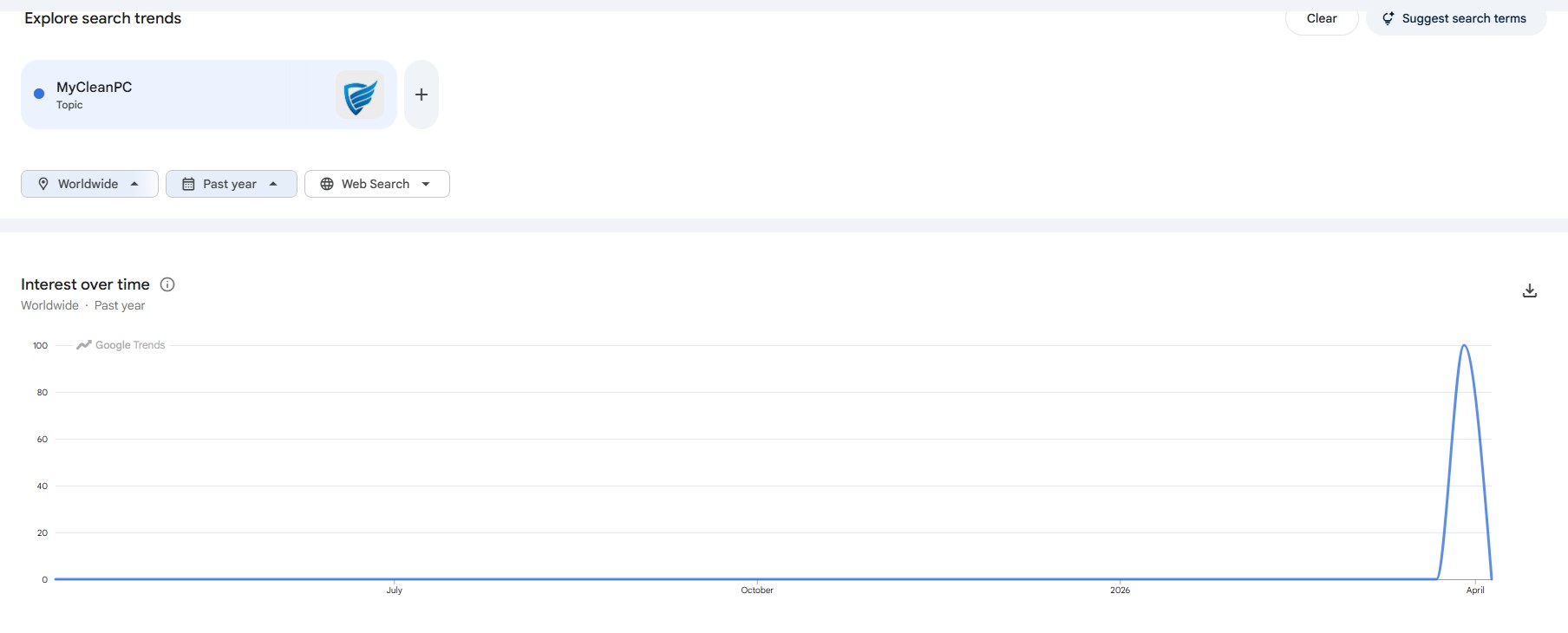
The easiest way to gauge people’s interest in a specific product, service, or keyword is to ask Google. So, I used Google Trends to get a fair idea of where MyCleanPC stands in the search landscape.
I discovered that the interest graph stayed flat for most of the past twelve months. It only noticeably spiked in April 2026.
I guess people started searching for the new version when it went live, as MyCleanPC ran extensive campaigns on social media around that time to spread the word out.
Not stopping there, I stacked it up against a few big names from this market segment: Wise Care 365, Auslogics BoostSpeed, IObit Advanced SystemCare Pro, and Ashampoo WinOptimizer.
The difference was glaring.
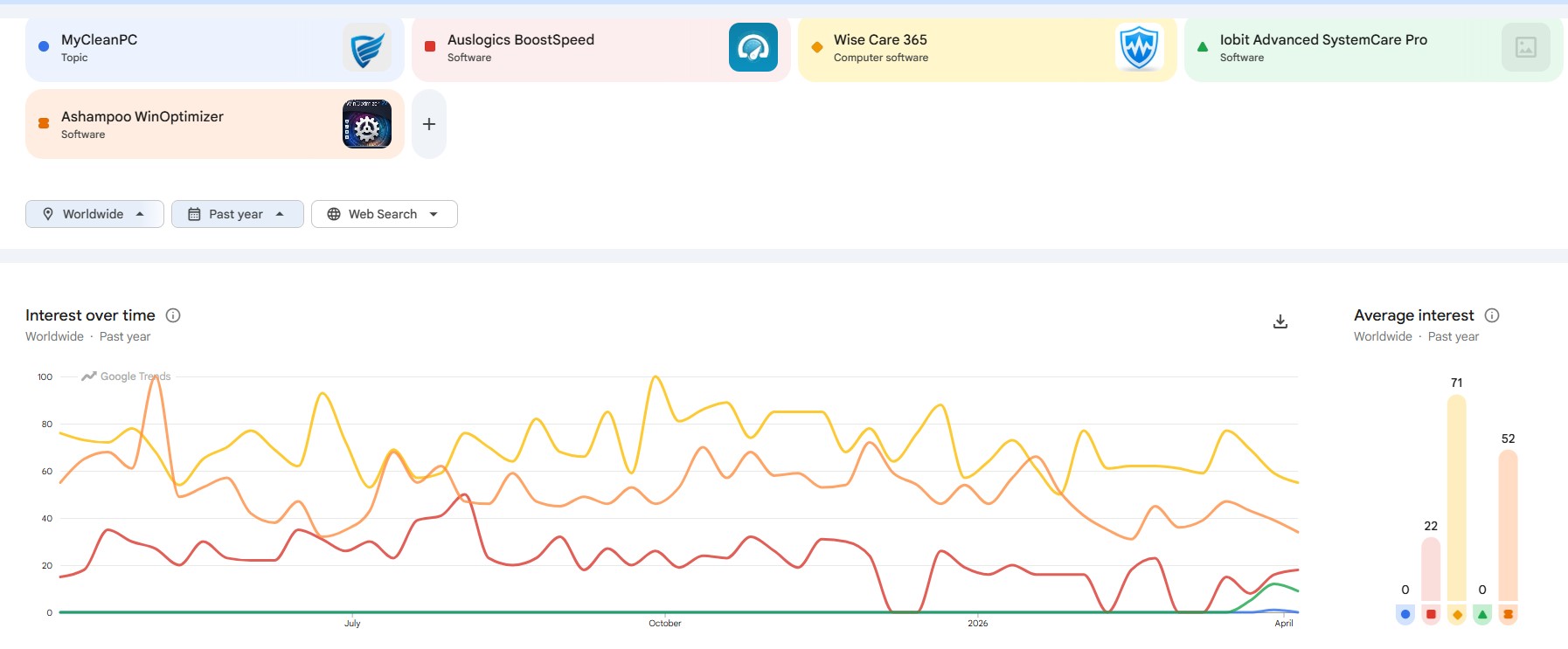
Wise Care 365 sits atop the search trends data graph, as it’s one of the leading colutions at this moment. Ashampoo and Auslogics were not far behind either.
IObit has only received lukewarm response from the market, but it still stays ahead in the game compared to MyCleanPC.
MyCleanPC is clearly not in the big league as of now. But it definitely shows some promises. I decided to dig deeper and find out where it lags behind and where its biggest strengths are.
Here’s what I found.
MyCleanPC vs competitors
<strong>MyCleanPC vs Competitors – Where It Wins (And Where It Doesn’t)</strong>
| Feature | MyCleanPC | Wise Care 365 | Auslogics BoostSpeed | IObit Advanced SystemCare | Ashampoo WinOptimizer |
| Supported devices | 1 | 1 | 3 devices | Up to 5 devices | 3 devices (on yearly plan only) |
| PC cleanup | | | | | |
| Scheduled cleaning | | | | | |
| Startup optimization | | | | | |
| Registry cleaner | | | | | |
| Real-time monitoring | | | | | |
| File recovery | | | | | |
| Free trial | | | | | |
| Moneyback guarantee (days) | 30 days | 60 days | 30 days | 60 days | 30 days |
Users' feedback
<strong>What Are the Existing MyCleanPC Users Saying?</strong>
To understand people’s unbridled opinions, the best place to head to is the social media sites.
Reddit is one site that doesn’t filter out comments of users who post anonymously, unless the comments and posts are spammy.
I dug into the site and found that existing users have mixed opinions about the software, which is quite natural.
However, I noticed a common and interesting pattern. Most users have no idea of how the software works under the hood, yet they appreciated the distinguishable boost in their PC performance.
The general sentiment towards the Windows desktop application seemed more positive when I veered to Trustpilot.
Here, the discussion is predominantly about the pre- and post-sales customer support. People seem happy about the US-based tech support’s incredible ability to help them out when they need it.
If you are a non-technical user yourself, you can take this into consideration.
Conclusion
<strong>Is MyCleanPC Worth It?</strong>
MyCleanPC is a PC cleanup and optimization tool, not a full suite of security products. It focuses on removing junk files, adware, registry issues, and privacy traces, but it does not provide comprehensive antivirus or advanced security protection. Also, the fact that it only supports only 1 device per license makes it much less economical as a solution.
Otherwise, it’s a decent tool and it perfectly lives up to its name. It does what it says, and since it runs on a freemium model, you can actually detect issues in your PC using the free trial.
If you want an additional layer of security along with a PC cleanup solution, I suggest going for System Mechanic Ultimate Defense, which is a more comprehensive (and pricier) alternative. But if you just want PC cleanup, this one can be your best bet.